Logo
FAQ Cannot send data from Mac to VersaWorks
  1. Roland DG Care
  2. General
  3. Maintenance

Menu

Cutting blade offset and wear

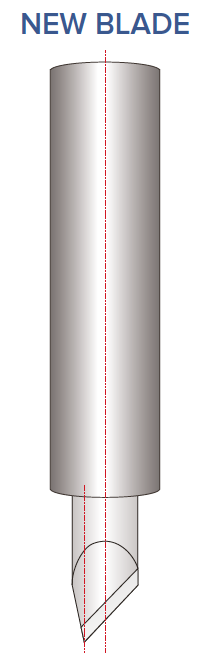
To get a perfect cutting accuracy, it is important to set the correct offset and replace the knife in case it is worn.

If the correct offset has been entered into the
machine and you are using a new blade, the
test cut should appear like the above
diagram, the circle should be perfectly aligned
and the corners of the square should be at a
right angle.


Screenshot_2022-05-11_at_09.07.57.png
Screenshot_2022-05-11_at_09.08.03.png

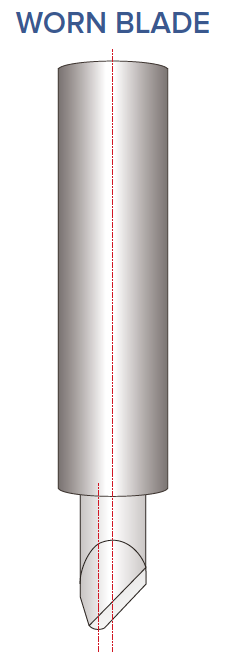
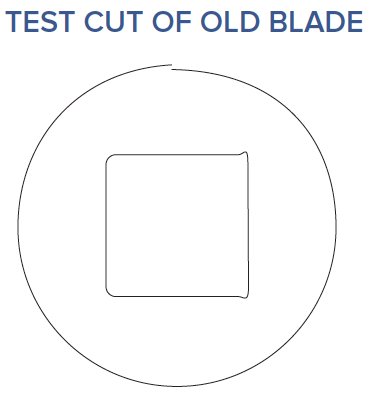
If the blade is worn you may see a test cut 
like the diagram, you can try to adjust
the offset value on the machine to
compensate for this, however the only
solution for this is to purchase another blade.
Blade wear will vary on how much you use
the machine. This problem could also be becaused the blade holder is wear.

Screenshot_2022-05-11_at_09.11.51.png
Screenshot_2022-05-11_at_09.11.59.png


Was this article helpful?
3 out of 5 found this helpful
Return to top

Related articles

  • Adjusting the Cutter blade extension
  • Overview of all knifes/blades with correct parameters and specs
  • [Sheet cut] no longer works.
  • 【VG2/SG2】 Maintenance Cleaning Video
  • When the printer is not in use, can I turn off the main power or unplug the power cable to save power?

Copyright © Roland DG Care. All Rights Reserved

Deutsch Español Français Italiano 日本語 한국어 Português do Brasil