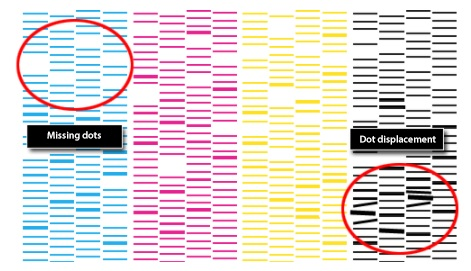
Missing dots or dot displacement
If the test print has missing dots or dot displacement as shown below, normal printing cannot be performed.
Solution
*Please follow the procedure below in the following order.
1) Perform cleaning
Perform cleaning on the operation panel of the machine.
2) Perform medium cleaning
If there is a large dot missing, or if cleaning does not improve the problem, perform medium cleaning from the operation panel.
3) Perform cleaning around the print head
Use a cleaning kit to remove dirt from the print head and wipers.
4) Perform powerful cleaning
If (3) does not improve the situation, perform powerful cleaning from the operation panel.