Logo
FAQ Cannot send data from Mac to VersaWorks
  1. Roland DG Care
  2. VersaWorks
  3. Using Spot Colors and Special Colors

Menu

Data created with Roland Color System Library cannot be recognized by VersaWorks.

* The same is true if the colors are not correct even though the Roland Color System Library colors are used in the actual output.


Please check the following settings.

- Check [Edit] > [Spot Color Settings] > [Library List].

   00209130_02.PNG
- Check [Job Settings] > [File Format] > [Convert Spot Color].
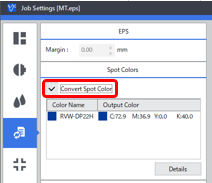
   00209130_01.PNG
 

Was this article helpful?
1 out of 2 found this helpful
Return to top

Related articles

  • How to use Roland Color System Library
  • Add a cut line to print data
  • How to create CorelDRAW cutline (CutContour) data
  • How to create a gradient using multiple spot colors
  • Printing with crop marks

Copyright © Roland DG Care. All Rights Reserved

Deutsch Español Français Italiano 日本語 한국어 Português do Brasil