Logo
FAQ Cannot send data from Mac to VersaWorks
  1. Roland DG Care
  2. VersaWorks
  3. Using Spot Colors and Special Colors

Menu

Creating white data

1) Create the data in Illustrator.

2) Go to [Window] > [Swatches Library] in Illustrator and open [Roland VersaWorks].

3) Assign a [RDG_WHITE] swatch to the data, and set the border to no fill.

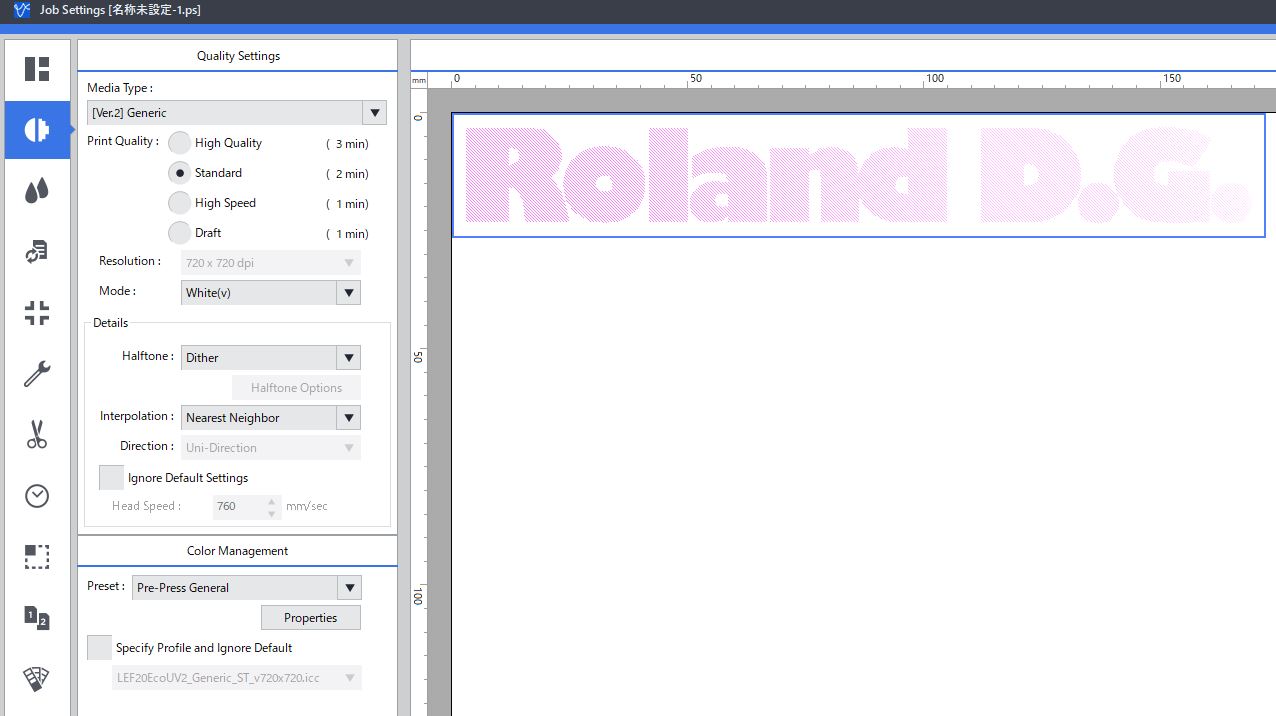
4) Output to VersaWorks 6 and set [Job Settings] > [Quality] > [Mode] to white output mode such as White(v).

5) Confirm that the pink diagonal line appears on the preview screen.

6) Overprint can be set separately.
00230072_01.JPG

Was this article helpful?
1 out of 2 found this helpful
Return to top

Related articles

  • Create white and metallic data in Illustrator
  • How to create a gradient using multiple spot colors
  • Data created with Roland Color System Library cannot be recognized by VersaWorks.
  • Can I use Corel Draw to print gloss or metallic textures?
  • Add a cut line to print data

Copyright © Roland DG Care. All Rights Reserved

Deutsch Español Français Italiano 日本語 한국어 Português do Brasil