Logo
FAQ Cannot send data from Mac to VersaWorks
  1. Roland DG Care
  2. VersaWorks
  3. Output Settings

Menu

Changing printing speed

Increasing printing speed will result in lower print quality. Please select a setting that strikes a good balance between the quality and speed you require.


In [Quality] tab, changing the following settings will change the printing speed.

 1) Media Type
 2) Print Quality
 3) Resolution
 4) Mode
 5) Direction
 6) Ignore Default Settings
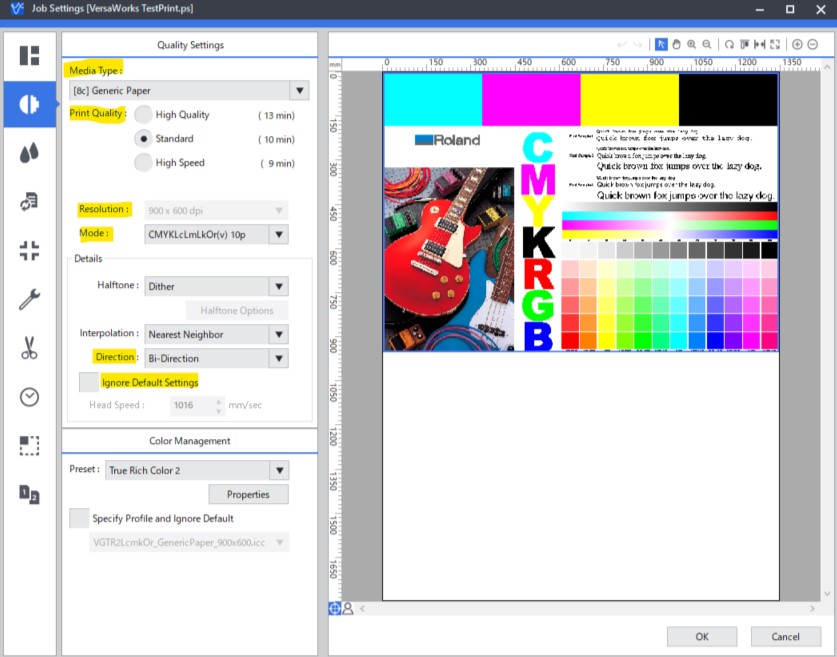
VW_Job_Settings_Quality.jpg

Was this article helpful?
0 out of 0 found this helpful
Return to top

Related articles

  • Changing the print head speed
  • Reduce printing time
  • Change the width of print head movement
  • Convert to grayscale
  • The density setting of darkest Black

Copyright © Roland DG Care. All Rights Reserved

Deutsch Español Français Italiano 日本語 한국어 Português do Brasil